My Photo
Name: Colleen
Location: Arizona, United States

My name is Colleen and I find dead people.

[ View Guestbook ] [ Sign Guestbook ]

11 October, 2009

Where oh Where Have My Hodicks Gone?

Oh where, oh where could they be? I have them in '00, and in '20 & '30, but where were they in 19 and 10? Oy.

Sorry. But every time I try to begin this post about my HODICK dilemma that silly song comes into my head.

I've rejuvenated my efforts to add citations to my RootsMagic4 database but I've run into a major roadblock: As I was citing sources for my paternal great-grandfather Edward HODICK, I realized that I am missing his family in the year 1910. So what do I do? Continue citing the sources I have? Or go off on a genealogical tangent and search for them again in 1910? I suspect you know the answer ;).

In 1900 my great-grandparents and their children were in Washington Township, Crawford County, KS, under the spelling HODIZ (thanks to Ella Buzzard of the Crawford County Genealogy Society for helpin me find this listing!). In 1905 they were in Frontenac, Crawford County, KS under the spelling HUDIC. An interesting side, there is also a Frank HUDIC listed in Frontenac in 1905, about 11 pages prior to "my" HUDIC family's listing.

I know that in 1910 my great-grandparents were still in Kansas, as their youngest child, Sylvestina (Vesta) was born 29 Dec. of that year in Kansas. I did find their oldest son, William, in Frontenac in 1910, married to an "Amielin". No one seems to know an Amielin, so this may not be ours, though all the data on William's listing in 1910 fit our HODICK family, including William's birthplace of PA. But there is no sign of the rest of them. I did do a page-by-page search of the series of records in which I found William, but no surnames even resembled HODICK in the pages prior to and following William.

So last night I left it at that, vowing to return to my citations today. Which I started until I decided to look for NAHADIL/NAHODIL instead, which was Edward's wife, Justina's maiden name. I figured if I couldn't find the HODICK family perhaps I coulf find the NAHADIL/NAHODIL family and find the HODICK family via a back door. No luck. I did find two listings for John NAHODIL in the 1900 U.S. Census in Nanticoke, Luzrene County, PA. One was living with the Edward and Annie Holobak family, listed as the "father-in-law" to Edward. John was 66 years old, and was born in Austria and immigrated to the U.S. in 1891. This entry was listed on page 52 of the series. On page 49 of this series is John and Katie NAHODIL, ages 28 and 20 respectively, both born in Austria, both immigrated to the US, in 1892 & 1893 respectively.

No sign of the HODICK family, thought I'm a long way from showing a relationship between the John NAHODILs and Justina HODICK. I suspect that I will need to do a page-by-page search of Crawford, Cty KS to find them, if they're even in there. In the meantime, I suppose I'll return to my citations. It seems the prudent thing to do.

31 August, 2009

Database Overhaul Session 9

I dug back in and finished up sourcing my paternal McHugh line yesterday and today. 26 people down, only about ... I dunno ... 700 or so left to do? Hey you have to start somewhere.

There've been a few mind blocks to my sourcing as I go. The big thing is to change how I define a "Source". I didn't source before because I didn't think I had anything worth citing. I don't have much by way of original records and such so what was there to record? I had to stop thinking about a "Source" as "Only official, primary documents" and start thinking about a "Source" as anything from which I gathered my information. If my information came from a Census record, that's a source. If it came from an email from a trusted cousin, that's a source. So in my current process of referencing my data I'm being sure that I record all the sources I have, not just primary ones. I just need to understand what type of sources they are (primary, secondary, etc) so I'll know how reliable they are.

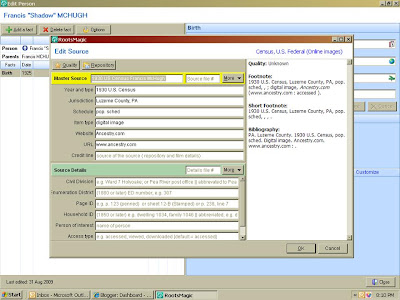
I am running into one big problem with RootsMagic4, though. One of the things that lured me to switching from Family Tree Maker was the pre-set source templates. RM4 allows you to choose your source template. This might be a pre-set one for something off their long list of sources (BMD, Census, Obits, Newspaper, Email, etc. etc), or it might be a source you'd already referenced in the database. For example, I used the 1900, 1910, and 1930 U.S. Census records repeatedly. When I go to cite a Census record from one of those years for Annie and I'd already used that source for John, I click on the "Cite Existing Source" icon in the Source field and click on the Census record I want to use for Annie. So when the template I chose from the "Cite Existing Source" tab comes up for Annie, the fields are already filled in since I manuallye entered them before, right?
Wrong! Only the top fields are pre-filled in (in the screen shot above, the text in the bottom portion is the generic information that explains what to type there, not the text I'd previously entered). I have to manually enter the Ward, ED Number, etc. (whatever information is on the bottom portion of the template) for each new use, even though I'd elected to use one of my pre-filled sources for this new person.

This is the case regardless of what type of source it is. If it's a Census template that I chose from the "Cite Existing Source" tab, the specifics of that Census document that's listed on the bottom half of the field is blank. If it's an email correspondence I'm sourcing from the "Cite Existing Source" tab, the information from the bottom portion of that template is not transferred automatically. I'm finding this incredibly inconvenient and annoying. If I saved a source template, why doesn't it save the entire template as I had it filled out and transfer all of the data I input?

04 July, 2009

Fighting for Justice and Celebrating Independence

I decided that for my entry for the 75th edition of the COG, I would post a slideshow of a combination of all three topic requests: Some photos depict ancestors who have served in our armed forces. Others show family and/or friends celebrating either what may have been our nation's history, or just the freedom to hang out and be American. Finally, I added a little bit of music by none other than a British Superstar to represent how far we've come to bridge the differences that once tore two worlds apart.

Freedom
Sir Paul McCartney

This is my right
A right given by God
To live a free life
To live in freedom

Talkin' about freedom I'm talkin' about freedom
I will fight for the right to live in freedom

Any one tries to take it away
You will have to answer
Cause this is my right

Talkin' about freedom I'm talkin' about freedom
I will fight for the right to live in freedom

Yeah Oh Talkin' about freedom I'm talking about freedom
I will fight for the right to live in freedom

Everybody talkin' about freedom we're talking about freedom
We will fight for the right to live in freedom

Oh talkin' about freedom I'm talkin' about freedom
I will fight for the right to live in freedom

Talkin' about freedom we're talkin' about freedom
We will fight for the right to live in freedom

19 May, 2009

Database Overhaul Day 8 Updated

In regards to the glitch with RM4, I deleted the small, hand-entered file I'd originally started since I don't use it. I then closed the program. I got the same window asking me if I wanted to "Backup This Database", "Skip this Database", or "Skip All Databases". I chose to "Backup This Database". It backed it up and I got the little window saying so. Again, it gives me the same window asking what I want to do with the database. This pop-up window will continue to appear until I click on "Skip This Database". Since there is now only one database file in there, it should close after I make my initial selection. Why does this matter? In the scheme of things it's not a big deal, but I start second guessing myself when I see the same window continually open; it makes me think I did something wrong or didn't complete something.

17 May, 2009

Database Overhaul: Day 8 and a Success Story!

I was able to do a little more work on my overhaul. I was working on my paternal grandfather, Joseph Dennis McHugh. I'd had his death date as 29 Sep 1976, but no source was listed. I checked the SSDI and it only had the month and year. I checked all my obits, but do not have any referencing him after his death. Therefore, I removed the "29" from his death date since I don't have a clue how that date came to be. I did make a note of it in his "Death Notes" section, though so I will know later to research it.

Now I think I have found a bug in RootsMagic 4. When I started working with RM, I'd begun manually entering data, starting with myself. After determining that it was too difficult to do it this way since I didn't have a printed report to work on, I imported my file from Family Tree Maker. I made this imported file a new file; I did not merge it with the little information I'd entered by hand, and I named the imported file something different.

Now the glitch. When I close down RM4, I get a window that says "Back Up the Following Databases?" with the name of the open database and three choices: "Back Up This Database", "Skip this Database" and "Skip all Databases". Since I'm only working on one and had only opened that one (the imported one), I click on "Back Up This Database". I then get the same pop up window for the small, hand-entered database I didn't open, so I click on "Skip this Database". I then get another pop-up window that asks me what I want to do with the first, imported database I was working with and already backed up. After saying "Yes" to overwriting this database, it will then close. If I say no to overwriting, I'll keep getting the pop-up window asking what I want to do with the file until I click on "Skip all databases". What's up with this?

Now, a SUCCESS STORY :). For some reason, I decided to do a search for my elusive paternal great-grandparents' family in 1900 in Kansas. Once again, I plugged his name (Edward Hodick) into Ancestry.com, narrowing it to 1890-1915, and expanding to use Soundex. The first result was a Kansas State Census database I'd never seen before: Must have been one of the new additions to the site. I scrolled one page for the indexed Edward Hudic and guess what? It's THEM!
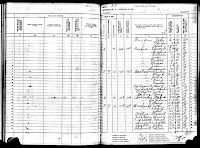
(photo courtesy of http://www.ancestry.com/)

How cool is this? Not much information on this page, but it still is something. They were living right where I expected them to: In Frontenac, Crawford County, KS. In the 1900 U.S. Census, they were in Washington Township, KS, which I'm guessing is a neighboring town in the same county. I'm still looking for him in 1910. From Sylvestina Hodick-Kovaleski-Kinney's obituary (my grandma's sister), the family moved to Askum, PA in 1915, and Sylvestina (Vesta) was born in Kansas in 1910 or 11.

29 April, 2009

Database Overhaul: Day 7

Well, after today my updates will be a bit fewer and farther between as I return to work full-time tomorrow. So I made some good use of my time by returning to my printed family history narrative and checking my data and sources. This is not only tedious, but confusing at times!

You'll recall that early on after purchasing RM4, I changed my mind about manually entering all of my information and imported my data from Family Tree Maker. Then, after I purchased and set up a new printer unit, I printed out a narrative from RootsMagic4, starting with myself and working backwards in the report. In this printout, everything I had entered into FTM printed out, which told me all the information transferred, since I was printing from RM4.

Today, as I was working on source citations for my grandparents and great-grandparents, I noticed something very odd as I was updating resources for my grandfather, Joseph McHugh: Though the notes printed out in the narrative generated from RM4, I could not find the same notes in the actual database! I looked and looked, and couldn't find them. So I looked for notes on my other paternal great-grandfather, Edward HODICK and his were in the database and on the printed narrative. So I went back to my great-grandfather Dennis Joseph McHUGH and his wife, Mary GRIFFIN. The notes were there! And it dawned on me: I was looking for my dad's paternal grandparents' notes under my grandfather's screen. I navigated to my GREAT-grandparents and found what I was looking for. This wouldn't have happened if I hadn't strayed from the task of updating my grandfather's sources by doing an Ancestry.com search for my great-grandfather of the same line. Shame on me for making such a beginner mistake.

However, as I slowwwwwwly make progress with citing sources, I have another question: Is there a way to delete a recurring source from all entries? When I imported the data from FTM, RM4 automatically added the imported GEDCOM as a source and cited that GEDCOM as a source for all data. Well, I did not cite sources too well in FTM (I actually have a LOT more than I thought I did, but they are listed under individuals' Notes in FTM, not as a separate entry) and I do not want that GEDCOM listed as a source. I know I can delete the source from each individual, but can I do an overall delete of that citation?

28 April, 2009

Database Overhaul: Day 6

Today's overhaul post poses a question for my fellow genealogy buffs. RootsMagic 4 has several places for entering sources. When you double-click on a person's name, you are brought to the "Edit Person" screen. For ease in formulating my question, I will refer to this screen as the person's "General" screen. The white field on the left lists the person's name at the top, then the facts as you choose to include them, such as birth, confirmation, marriage, death, etc. To the right of these facts are columns for Notes, Sources and Media that are checked off when data is entered about these facts. This way you can see at a glance if you have any sources for this person. If you double-click on the check in, say, the Media column, it shows you the items you have attached to this person. When the person's name is highlighted (defaulted when you first open this screen), then the five buttons in the blue section relate to General information about that person; you can add Notes; Sources; Media; Address; and To-Do tasks.

If you highlight a fact, however, the five buttons change to four and allow you to add Notes, Sources, Media and To-Do tasks, all of which relate to that highlighted fact. I will refer to this screen as the "Event Specific" screen. Now, logic would say to enter birth notes, media, sources and to-do tasks under the birth fact, enter marriage data under the marriage fact, etc.

My question is, would there be any harm in foregoing the specificity in this and just entering all the data under the "General" screen? I had noticed that I had entered sources and media and a note for my Grandmother HODICK under her "General" screen and the information is still recorded in the fact columns for which the data was entered (i.e., I have her obituary listed as a source, and even though this source is listed under the "General" screen, it is still accounted for in the check off columns for death source. In other words, event specific sources, notes, and media are still indicated for each fact even if the information was not entered in the fact specific field but in the general field. So what's the disadvantage to just entering notes, sources, and media under the general field and not worry about being more specific?

Also, RootsMagic4 users, how about some ideas on entering source information? I could also use advice on how to enter source information in the "Edit Source" field: I want to be consistent in how I idenitify the master source, repository, etc. I did get a response to this on FB that I will be re-visiting but wanted to pose it here as well.

22 April, 2009

Database Overhaul: Day 5

As you can see, I've taken some time to update the appearance of this blog a little bit. I added a new header that {ahem} I made all by myself. Okay, so it's not perfect but it's MINE.

I also widened the background and the text area, thanks to Blogger Guide. I'm still working on widening the profile container to match the rest of the blog; as you can see it's a bit off-kilter at the moment.

If you're a blogger user, and not an expert on html/formatting, I highly recommend visiting Blogger Guide (http://www.bguide.blogspot.com/). The instructions on widening my text area were written for the newer Layout format, and this blog is in the old "Template" format of Blogger. However the instructions were the same and it was very easy to follow.

As for the database overhaul, well, I took a break from that as I was bound and determined to put a new header on this thing. Opinions wanted: Should I add a third column to the right and split up the "busy-ness" of the left sidebar? Or do you prefer the wider text field that I currently have?

21 April, 2009

Database Overhaul: Day 4

Today I took a little break from adding sources and creating to-do lists and added digital media to some of my lines, starting with my generation. I completed adding at least one photo for my parents and my dad's parents and his siblings. I added photos to the Hodick family members for which I had photos and knew the figures in them.

I then opened a Family Group Sheet for each of these three generations (my immediately family, my dad's immediate family, and his mother's immediate family). I like the way it looks with photos inserted!
It's going to take me forever to finish my overhaul, and I'm hoping to keep this blog abreast of my progress.

Tomorrow it's back to sourcing and to-do lists!

20 April, 2009

Database Overhaul: Day 3

Today I started creating To-Do lists with RootsMagic4. I started by identifying the need for my nearest deceased ancestor, my mother, who died in Tempe, Az in 1988. I first did a search of the Internet to determine where to request her death certificate, as I'm keeping with the traditional method of genealogical research by starting recent and moving backwards.

Once I obtained the location to which I need to send my request, I added the task to RootsMagic4: All's well and good, no? Well, no. For a few reasons. First, I entered the information in the wrong menu option for "To-Do" list. What I did was highlight the person I was seeking in the Family View screen and navigated to "Lists" on the top tool bar. I then chose "To Do" and entered necessary information into the appropriate fields and clicked "OK". Done. Except I wasn't.

See, I didn't have a way to identify for whom this task was assigned. Simple solution: Open the Task and enter mom's name in the "Reference Number" field, since I am not using reference numbers (if anyone has input on whether I *should* use reference numbers and if so, how do I do that, please "Comment" below). Done. Except I wasn't.

Because when I double-clicked on my mother's name in the Family View screen to see her data sheet, I noticed in the bottom-right-hand corner, where the buttons are for sources and files, a button for "ToDo". Clicking on that, I expected to see the tasks I'd entered (obtain death and birth certificates). But I didn't. Perhaps this would have been resolved had I used reference numbers? Will have to research that. In the meantime, since I am oh-so-impatient, I simply re-entered the information here.

What I found odd is that if I enter a task under the top tool bar "Lists", the task does not show in the person's "ToDo" screen when I click on that button on the personal data screen. But if I enter the information on the person's data screen, then later go to the top toolbar option "Lists>ToDo", the tasks I had entered in the person's screen DO appear. {whew}. Now the question remains: Once I enter in a series of "ToDo" tasks for different individuals (on their worksheet screens), will I be able to print a single report of all tasks I have entered for all individuals? I'm betting I can.

And I can. I suppose I need to add obtaining her marriage certificate to the mix, since I'm sure my dad does not have this. I'm almost sure many of our family documents (including birth certificates for us kids [I had to order a copy of my own], marriage certificate, and goodness knows what else) "got lost" during my dad's second marriage, though it seems odd since his second wife's mother was into genealogy (by hand). Course, his second wife hated her mother's obsession with it.

Another obstacle to obtaining records is going to be states' rules on requesting them. I should be able to get my mother's death certificate here in Arizona without a problem. However, New York State, where she was born, requires that the certificate be on file for at least 75 years and that I be able to prove she's deceased (this one is not a problem). I could, as my mother's child, request a certified copy of her birth certificate, but that would require me to obtain a court order from the State of New York. Might be easier to wait four years for the genealogy copy!

I will need my dad's help to obtain copies of his parents' death certificates from New York State, as he is entitled to it as their child, but I am not as their grandchild. I should be able to get his grandparents' death certificates on my own, since they died over 50 years ago.

So far I am liking RootsMagic. It certainly is quicker to load and navigate through than my FTM. I wish I wasn't as impatient and actually read instructions more! But, on the same token, I tend to remember more by doing it, so the time lost by re-doing something is often worth it. Assuming, of course, I catch my mistakes right away, and not 4 years after starting the project!

Who links to me?
http://www.hit-counter-download.com